
Catalyst9115AXでAireOS(8.10.xx)からIOS XEのEWCへ変換をしてみた
こんにちは。ネットワークソリューション特集 編集部です。
今回は、Catalyst9115AXでAireOS(8.10.xx)からIOS XEのEWCへ変換の検証をしました。
準備
①イメージファイル(APイメージファイル、EWCイメージファイル)
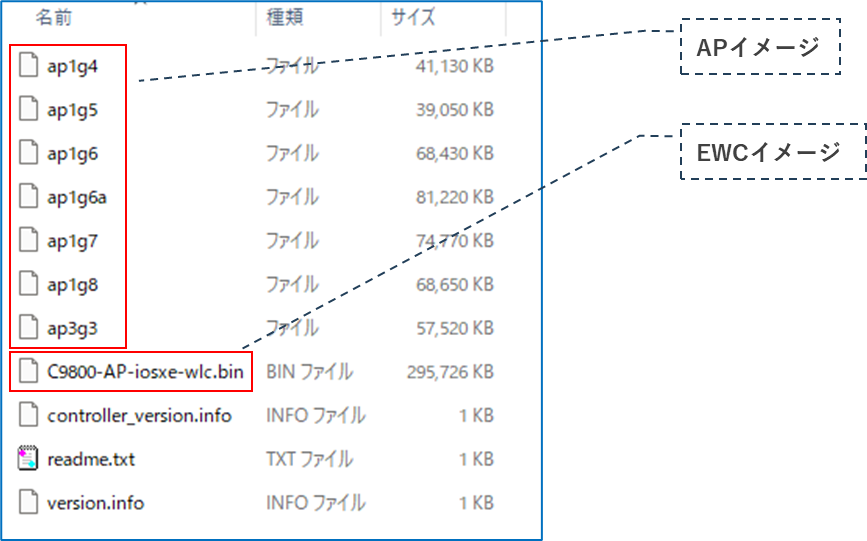
Cisco.comより対象機種のEWC(Embedded Wireless Controller)ソフトウェアのダウンロード(zip形式)し、解凍します。
解凍されたフォルダには、以下のようにAP とEWC のイメージファイルが含まれています。
なお、APイメージファイルに対応する機種は同フォルダの「readme.txt」に記載されています。
(今回検証するAPはCatalyst9115AX なので ap1g7 を使用します)
②作業用PC(TFTPサーバ、コンソール)
③L3スイッチ(今回は、PoE対応、DHCPサーバによるIPアドレス払い出しが可能な機器を使用)
ネットワークへの接続
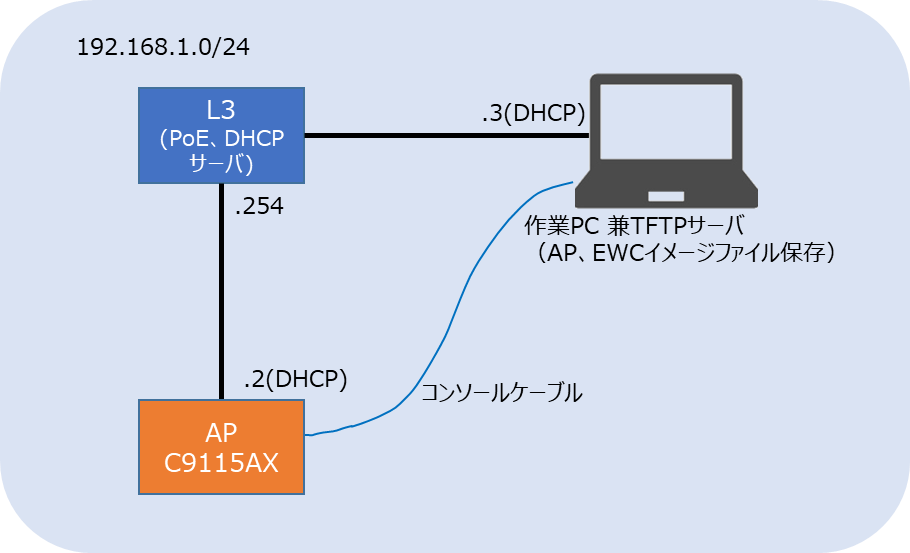
・以下の構成図を参考にAPがTFTPサーバにアクセスできるように接続します。
・あらかじめTFTPサーバには対応するAPとEWCイメージファイルを保存しておきます。
CLIよりAP、EWCイメージファイルのインストール
・作業PCからコンソールで AP にログインし、以下のコマンドを実行します。
ap-type ewc-ap tftp://[server ip]/[AP imagepath] tftp://[server ip]/[Controller ImagePath]
※イメージファイルの転送後、 APが自動で再起動します。
AP1#
AP1#ap-type ewc-ap tftp://192.168.1.3/ap1g7 tftp://192.168.1.3/C9800-AP-iosxe-wlc.bin
Starting download eWLC image tftp://192.168.1.3/C9800-AP-iosxe-wlc.bin ...
It may take a few minutes. If longer, please abort command, check network and try again.

######################################################################## 100.0%

Image download completed.
Checking ...OK
Checking image size...OK
Verifying ...OK
Versioning ...ws_management_version: 17.09.06.0.7681
Successfully downloaded and setup eWLC image.
Starting download AP image tftp://192.168.1.3/ap1g7 ...
It may take a few minutes. If longer, please abort command, check network and try again.
######################################################################## 100.0%

Image download completed.
Upgrading ...
upgrade.sh: Script called with args:[NO_UPGRADE]
do NO_UPGRADE, part2 is active part
upgrade.sh: Script called with args:[-c PREDOWNLOAD]
do PREDOWNLOAD, part2 is active part
upgrade.sh: Creating before-upgrade.log
upgrade.sh: Start doing upgrade arg1=PREDOWNLOAD arg2=,from_cli arg3= ...
upgrade.sh: Using image /tmp/cli_part.tar on axel-bcm ...
Image signing verify success.
upgrade.sh: part to upgrade is part1
upgrade.sh: AP version1: part1 8.10.183.0, img 17.9.6.40
upgrade.sh: Extracting and verifying image in part1...
upgrade.sh: BOARD generic case execute
upgrade.sh: Untar /tmp/cli_part.tar to /bootpart/part1...
upgrade.sh: Sync image to disk...
upgrade.sh: status 'Successfully verified image in part1.'
upgrade.sh: AP version2: part1 17.9.6.40, img 17.9.6.40
upgrade.sh: AP backup  version: 17.9.6.40
upgrade.sh: Finished upgrade task.
upgrade.sh: Cleanup for do_upgrade...
upgrade.sh: /tmp/upgrade_in_progress cleaned
upgrade.sh: Cleanup tmp files ...
upgrade.sh: Script called with args:[ACTIVATE]
do ACTIVATE, part2 is active part
upgrade.sh: Verifying image signature in part1
upgrade.sh: status 'Successfully verified image in part1.'
upgrade.sh: activate part1, set BOOT to part1
upgrade.sh: AP primary version after reload: 17.9.6.40
upgrade.sh: AP backup  version after reload: 8.10.185.0
upgrade.sh: Create after-upgrade.log
Successfully setup AP image.
Archive done.
EWCへの変換完了
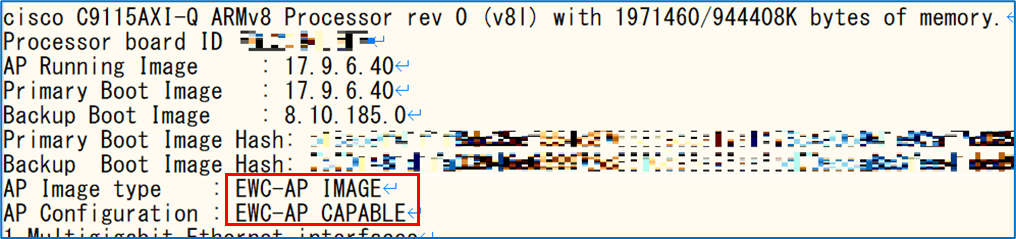
再起動後、show version でEWCモードにて動作していることを確認します。
まとめ
今回はCatalyst9115AXでAireOS(8.10.xx)からIOS XEのEWCへ変換の検証をしました。